AZ-900: Microsoft Azure Fundamentals
Question 221
A company is planning on setting up a solution in Microsoft Azure.
The solution would have the following key requirement:
- A tool that provides guidance and recommendations to improve an Azure environment
Azure Advisor
Azure Cognitive Services
Azure Application Insights
Azure Devops
Answer is Azure Advisor. Because this solution is a personalized cloud consultant that helps you follow best practices to optimize your Azure deployments. It analyzes your resource configuration and usage telemetry and then recommends solutions that can help you improve the cost effectiveness, performance, high availability, and security of your Azure resources.
For more information, please visit:
https://docs.microsoft.com/en-us/azure/advisor/advisor-overview
A company has a requirement to deploy 10 different types of Azure resources for several departments.
All of the resource types and configurations are the same.
Which of the following could be used to automate the deployment of the resources?
Azure Resource Manager templates
Virtual machine scale sets
Azure API Management service
Management groups
Answer is Azure Resource Manager templates. Because Teams need to manage infrastructure and application code through a unified process.
To meet these challenges, you can automate deployments and use the practice of infrastructure as code. In code, you define the infrastructure that needs to be deployed. The infrastructure code becomes part of your project. Just like application code, you store the infrastructure code in a source repository and version it. Any one on your team can run the code and deploy similar environments.
To implement infrastructure as code for your Azure solutions, use Azure Resource Manager templates. The template is a JavaScript Object Notation (JSON) file that defines the infrastructure and configuration for your project. The template uses declarative syntax, which lets you state what you intend to deploy without having to write the sequence of programming commands to create it. In the template, you specify the resources to deploy and the properties for those resources.
For more information, please visit:
https://docs.microsoft.com/en-us/azure/azure-resource-manager/template-deployment-overview
A company is planning on hosting solutions on within Microsoft Azure Cloud.
They need to implement MFA for identities hosted within Microsoft Azure.
Is it necessary to deploy a federation solution or sync on-premise identities to the cloud?
Yes
No
Answer is No. Because several options are available for managing identity in a cloud environment. These options vary in cost and complexity. A key factor in structuring your cloud-based identity services is the level of integration required with your existing on-premises identity infrastructure.
In Azure, Azure Active Directory (Azure AD) provides a base level of access control and identity management for cloud resources. However, if your organization's on-premises Active Directory infrastructure has a complex forest structure or customized organizational units (OUs), your cloud-based workloads might require directory synchronization with Azure AD for a consistent set of identities, groups, and roles between your on-premises and cloud environments. Additionally, support for applications that depend on legacy authentication mechanisms might require the deployment of Active Directory Domain Services (AD DS) in the cloud.
Cloud-based identity management is an iterative process. You could start with a cloud-native solution with a small set of users and corresponding roles for an initial deployment. As your migration matures, you might need to integrate your identity solution using directory synchronization or add domains services as part of your cloud deployments. Revisit your identity strategy in every iteration of your migration process.
For more information, please visit:
https://docs.microsoft.com/en-us/azure/cloud-adoption-framework/decision-guides/identity/
A company has deployed their solutions on to Microsoft Azure.
They have users that connect to Azure AD via the Internet.
They have the requirement that if users try to login from an anonymous IP address, they are then prompted to change their password.
Which of the following should the company consider for this requirement?
Azure AD Connect Health
Azure AD Privileged Identity Management
Azure Advanced Threat Protection (ATP)
Azure AD Identity Protection
Answer is Azure AD Identity Protection.
Identity Protection identifies risks in the following classifications;
| Risk detection type | Description |
| Atypical travel | Sign in from an atypical location based on the user's recent sign-ins. |
| Anonymous IP address | Sign in from an anonymous IP address (for example: Tor browser, anonymizer VPNs). |
| Unfamiliar sign-in properties | Sign in with properties we've not seen recently for the given user. |
| Malware linked IP address | Sign in from a malware linked IP address |
| Leaked Credentials | This risk detection indicates that the user's valid credentials have been leaked |
| Azure AD threat intelligence | Microsoft's internal and external threat intelligence sources have identified a known attack pattern |
For more information, please visit:
https://docs.microsoft.com/en-us/azure/active-directory/identity-protection/overview-identity-protection
A company plans to setup multiple resources within their Microsoft Azure subscription.
They want to implement tagging of resources in Microsoft Azure.
But they want to ensure that when resource groups are created, they have to contain a tag with a name of “organization” and value of “montana”.
You recommend using Azure locks for implementing this requirement.
Would this recommendation fulfill the requirement?
Yes
No
Answer is No. Because Azure Locks, from an administrator perspective means you may need to lock a subscription, resource group, or resource to prevent other users in your organization from accidentally deleting or modifying critical resources. You can set the lock level to CanNotDelete or ReadOnly. In the portal, the locks are called Delete and Read-only respectively.
Can Not Delete means authorized users can still read and modify a resource, but they can't delete the resource.
Read Only means authorized users can read a resource, but they can't delete or update the resource. Applying this lock is similar to restricting all authorized users to the permissions granted by the Reader role.
For more information on locking resources, please visit;
https://docs.microsoft.com/en-us/azure/azure-resource-manager/resource-group-lock-resources
A company plans to setup multiple resources within their Microsoft Azure subscription.
They want to implement tagging of resources within Microsoft Azure.
But they want to ensure that when resource groups are created, they have to contain a tag with a name of “organization” and value of “montana”.
You recommend using Azure Key Vault for implementing this requirement.
Would this recommendation fulfill the requirement?
Yes
No
Answer is No. Because Azure Key Vault is a tool for securely storing and accessing secrets. A secret is anything that you want to tightly control access to, such as API keys, passwords, or certificates. A vault is logical group of secrets.
For more information, please visit:
https://docs.microsoft.com/en-us/azure/key-vault/basic-concepts
A company has created a Resource Group (RG) as shown below.
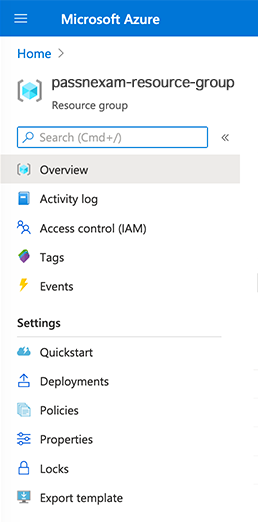
They want to ensure that resources within the Resource Group (RG) don’t get accidentally deleted.
Which of the following would you use for this purpose?
Access Control
Policies
Locks
Diagnostics settings
Answer is Locks.
As an administrator, you may need to lock a subscription, resource group, or resource to prevent other users in your organization from accidentally deleting or modifying critical resources.
Reference:
https://docs.microsoft.com/en-us/azure/azure-resource-manager/resource-group-lock-resources
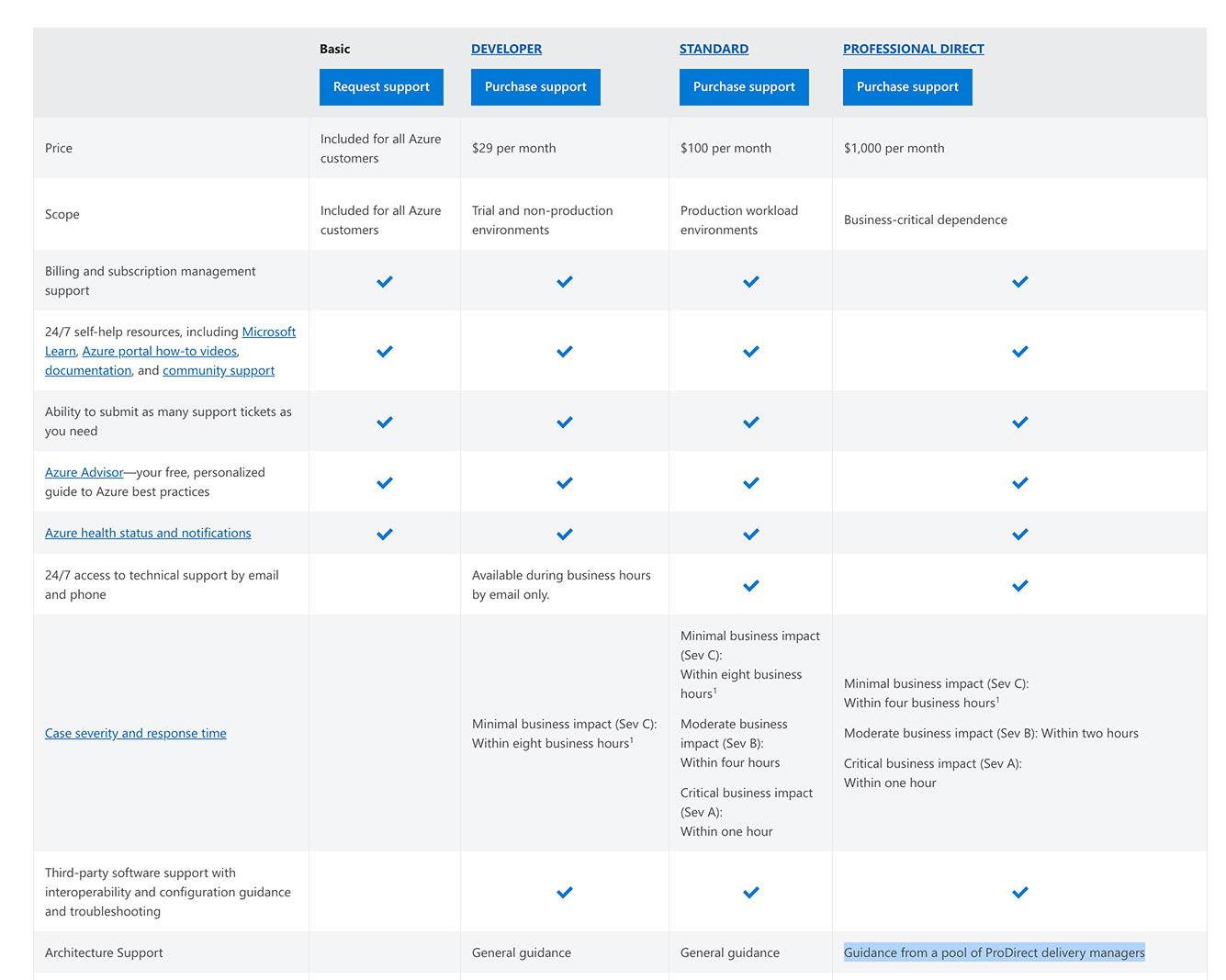
A company wants to purchase a Microsoft Azure support plan.
Below is a key requirement from the support plan:
- Regular architecture reviews from Microsoft for the Azure environment
Basic
Developer
Professional Direct
Standard
Answer is Professional Direct.
Because regular architecture reviews from Microsoft for a company’s Azure environment are included in this tier. See the comparisons within the visual below:
Reference:
https://azure.microsoft.com/en-us/support/plans/
A company has a set of Virtual Machines (VMs) defined within Microsoft Azure.
One of the machines was down due to issues with the underlying Azure Infrastructure.
The server was down for an extended period of time and breached the standard SLA defined by Microsoft.
How will Microsoft reimburse the downtime cost?
By directly sending money to the customer’s bank account
By spinning up another Virtual Machine free of cost for the client
By providing service credits to the customer
By providing a service free of cost to use for a specific duration of time.
Answer is By providing service credits to the customer. Because Microsoft Azure cloud service provider always refunded by giving “service credits” in case of breaches in their in SLAs. The “Service Credit” is the percentage of the applicable monthly service fees credited to customers following claim approval.
For more information, please visit:
https://azure.microsoft.com/en-us/support/legal/sla/virtual-machines/v1_8/
A company is planning on moving to Microsoft Azure.
Senior management wants to get an idea on the cost that will be incurred if decided to host resources within Azure.
You recommend using the Azure Cost Management to get the required costing of the resources.
Would this recommendation fit the requirement?
Yes
No
Answer is No. Azure Cost Management is a native Azure cost management solution. It helps you analyze costs, create and manage budgets, export data, and review and act on optimization recommendations to save money while already in production.
For more information, please visit:
https://docs.microsoft.com/en-us/azure/cost-management/overview