AZ-900: Microsoft Azure Fundamentals
Question 161
Match the cloud model to the correct advantage.


Box 1: Public Cloud
With a public cloud, there is no capital expenditure on server hardware etc. You only pay for cloud resources that you use as you use them.
Box 2: Private Cloud
A private cloud exists on premises, so you have complete control over security.
Box 3: Hybrid Cloud
A hybrid cloud is a mix of public cloud resources and on-premises resources. Therefore, you have a choice to use either.
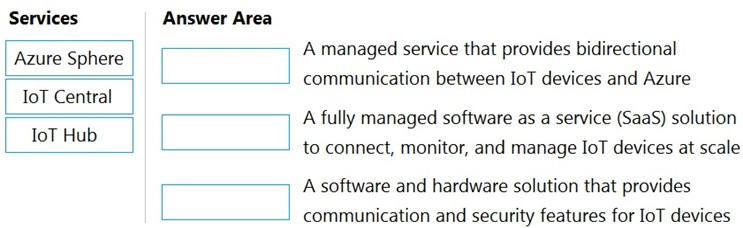
Match the Azure Services service to the correct description.
Instructions: To answer, drag the appropriate service from the column on the left to its description on the right. Each service may be used once, more than once, or not at all.
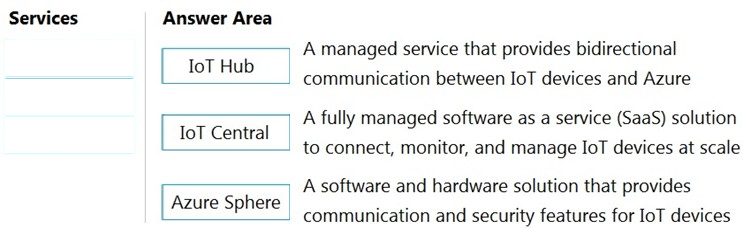
Reference: https://docs.microsoft.com/en-us/azure-sphere/product-overview/what-is-azure-sphere
https://docs.microsoft.com/en-us/azure/iot-central/core/overview-iot-central
https://docs.microsoft.com/en-us/azure/iot-hub/about-iot-hub
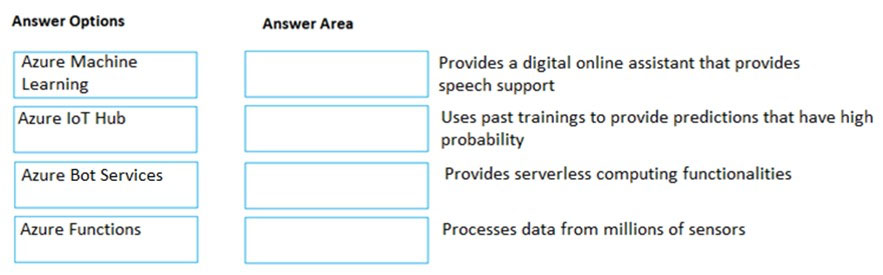
Match the Azure service to the correct description.
Instructions: To answer, drag the appropriate Azure service from the column on the left to its description on the right. Each service may be used once, more than once, or not at all.
Box 1:
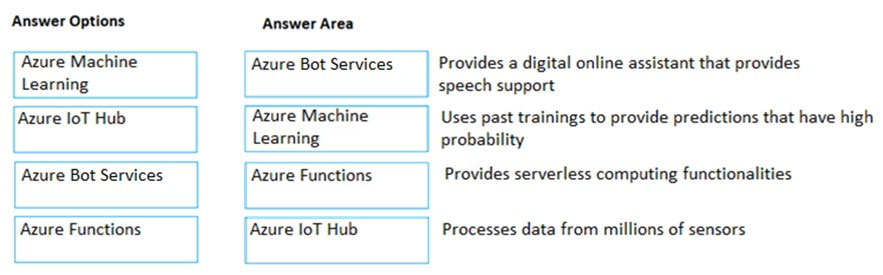
Azure Bot Services provides a digital online assistant that provides speech support.
Bots provide an experience that feels less like using a computer and more like dealing with a person - or at least an intelligent robot. They can be used to shift simple, repetitive tasks, such as taking a dinner reservation or gathering profile information, on to automated systems that may no longer require direct human intervention. Users converse with a bot using text, interactive cards, and speech. A bot interaction can be a quick question and answer, or it can be a sophisticated conversation that intelligently provides access to services.
Box 2:
Azure Machine Learning uses past trainings to provide predictions that have high probability.
Machine learning is a data science technique that allows computers to use existing data to forecast future behaviors, outcomes, and trends. By using machine learning, computers learn without being explicitly programmed.
Forecasts or predictions from machine learning can make apps and devices smarter. For example, when you shop online, machine learning helps recommend other products you might want based on what you've bought.
Box 3:
Azure Functions provides serverless computing functionalities.
Azure Functions is a serverless compute service that lets you run event-triggered code without having to explicitly provision or manage infrastructure.
Box 4:
IoT Hub (Internet of things Hub) provides data from millions of sensors.
IoT Hub is a managed service, hosted in the cloud, that acts as a central message hub for bi-directional communication between your IoT application and the devices it manages. You can use Azure IoT Hub to build IoT solutions with reliable and secure communications between millions of IoT devices and a cloud- hosted solution backend. You can connect virtually any device to IoT Hub.
References:
https://docs.microsoft.com/en-us/azure/bot-service/bot-service-overview-introduction?view=azure-bot-service-4.0
https://docs.microsoft.com/en-us/azure/machine-learning/overview-what-is-azure-ml
https://docs.microsoft.com/en-us/azure/azure-functions/
https://docs.microsoft.com/en-us/azure/iot-hub/about-iot-hub
Match the Azure service to the correct description.
Instructions: To answer, drag the appropriate Azure service from the column on the left to its description on the right. Each service may be used once, more than once, or not at all.
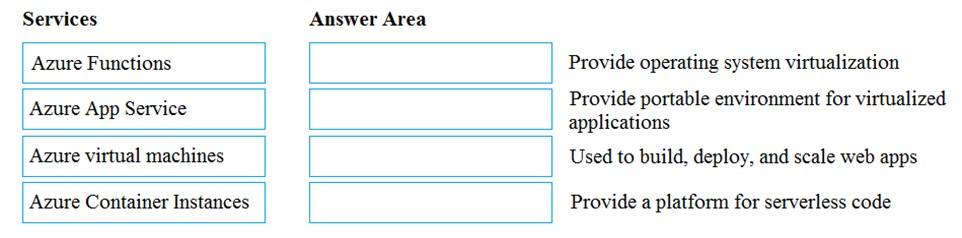
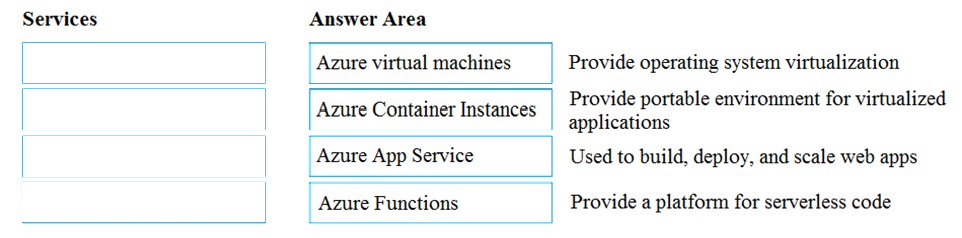
Box 1:
Azure virtual machines provide operation system virtualization.
Azure Virtual Machines (VM) is one of several types of on-demand, scalable computing resources that Azure offers. Typically, you choose a VM when you need more control over the computing environment than the other choices offer.
Box 2:
Azure Container Instances provide portable environments for virtualized applications.
Containers are becoming the preferred way to package, deploy, and manage cloud applications. Azure Container Instances offers the fastest and simplest way to run a container in Azure, without having to manage any virtual machines and without having to adopt a higher-level service. Containers offer significant startup benefits over virtual machines (VMs). Azure Container Instances can start containers in Azure in seconds, without the need to provision and manage VMs.
Box 3:
Azure App Service is used to build, deploy and scale web apps.
Azure App Service is a platform-as-a-service (PaaS) offering that lets you create web and mobile apps for any platform or device and connect to data anywhere, in the cloud or on-premises. App Service includes the web and mobile capabilities that were previously delivered separately as Azure Websites and Azure Mobile Services.
Box 4:
Azure Functions provide a platform for serverless code.
Azure Functions is a serverless compute service that lets you run event-triggered code without having to explicitly provision or manage infrastructure.
References:
https://docs.microsoft.com/en-us/azure/virtual-machines/windows/overview
https://docs.microsoft.com/en-us/azure/security/fundamentals/paas-applications-using-app-services
https://docs.microsoft.com/en-us/azure/azure-functions/
https://docs.microsoft.com/en-us/azure/container-instances/container-instances-overview
Match the Azure service to the correct definition.
Instructions: To answer, drag the appropriate Azure service from the column on the left to its description on the right. Each service may be used once, more than once, or not at all.
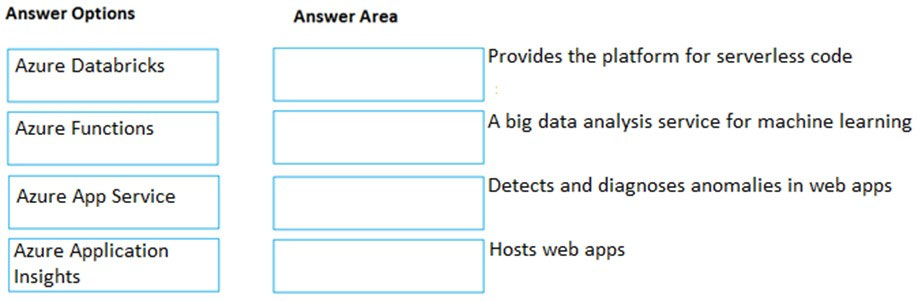
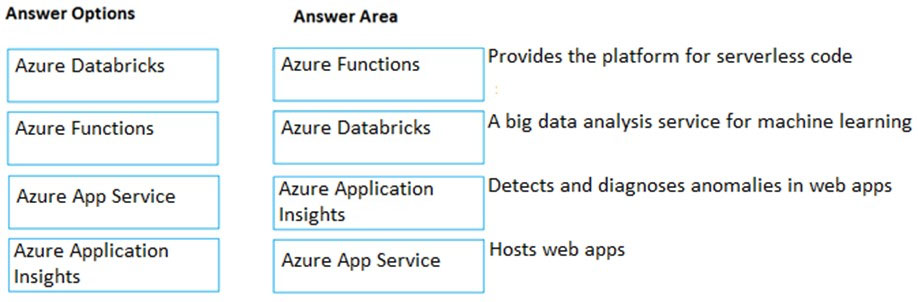
Box 1:
Azure Functions provides the platform for serverless code.
Azure Functions is a serverless compute service that lets you run event-triggered code without having to explicitly provision or manage infrastructure.
Box 2:
Azure Databricks is a big analysis service for machine learning.
Azure Databricks is an Apache Spark-based analytics platform. The platform consists of several components including ג€˜MLibג€™. Mlib is a Machine Learning library consisting of common learning algorithms and utilities, including classification, regression, clustering, collaborative filtering, dimensionality reduction, as well as underlying optimization primitives.
Box 3:
Azure Application Insights detects and diagnoses anomalies in web apps.
Application Insights, a feature of Azure Monitor, is an extensible Application Performance Management (APM) service for developers and DevOps professionals.
Use it to monitor your live applications. It will automatically detect performance anomalies, and includes powerful analytics tools to help you diagnose issues and to understand what users actually do with your app.
Box 4:
Azure App Service hosts web apps.
Azure App Service is an HTTP-based service for hosting web applications, REST APIs, and mobile back ends. You can develop in your favorite language, be it .NET, .NET Core, Java, Ruby, Node.js, PHP, or Python. Applications run and scale with ease on both Windows and Linux-based environments.
References:
https://docs.microsoft.com/en-us/azure/app-service/overview
Your company intends to subscribe to an Azure support plan.
The support plan must allow for new support requests to be opened.
Which of the following are support plans that will allow this?
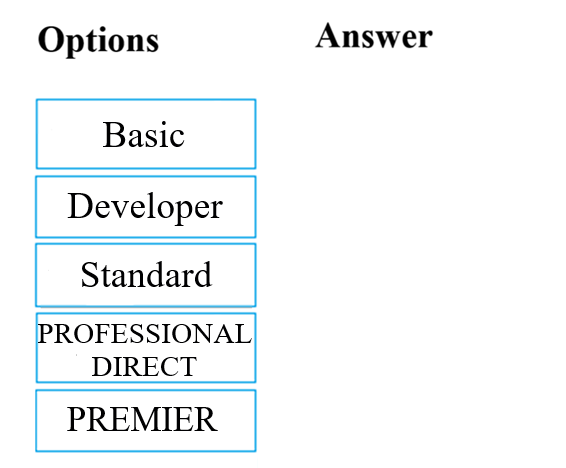
Answer is
Basic
DEVELOPER
STANDARD
PROFESSIONAL DIRECT
Reference:
https://azure.microsoft.com/en-us/support/plans/
You plan to deploy several Azure virtual machines.
You need to ensure that the services running on the virtual machines are available if a single data center fails.
Solution: You deploy the virtual machines to two or more availability zones.
Does this meet the goal?
Yes
No
Answer is Yes
Availability zones expand the level of control you have to maintain the availability of the applications and data on your VMs. An Availability Zone is a physically separate zone, within an Azure region. There are three Availability Zones per supported Azure region.
Each Availability Zone has a distinct power source, network, and cooling. By architecting your solutions to use replicated VMs in zones, you can protect your apps and data from the loss of a datacenter. If one zone is compromised, then replicated apps and data are instantly available in another zone.
Reference:
https://docs.microsoft.com/en-us/azure/virtual-machine-scale-sets/availability
You plan to deploy several Azure virtual machines.
You need to ensure that the services running on the virtual machines are available if a single data center fails.
Solution: You deploy the virtual machines to two or more regions.
Does this meet the goal?
Yes
No
Answer is Yes
By deploying the virtual machines to two or more regions, you are deploying the virtual machines to multiple datacenters. This will ensure that the services running on the virtual machines are available if a single data center fails.
Azure operates in multiple datacenters around the world. These datacenters are grouped in to geographic regions, giving you flexibility in choosing where to build your applications.
You create Azure resources in defined geographic regions like 'West US', 'North Europe', or 'Southeast Asia'. You can review the list of regions and their locations.
Within each region, multiple datacenters exist to provide for redundancy and availability.
Reference:
https://docs.microsoft.com/en-us/azure/virtual-machines/windows/regions
You plan to deploy several Azure virtual machines.
You need to ensure that the services running on the virtual machines are available if a single data center fails.
Solution: You deploy the virtual machines to two or more resource groups.
Does this meet the goal?
Yes
No
Answer is No
A resource group is a logical container for Azure resources. When you create a resource group, you specify which location to create the resource group in.
However, when you create a virtual machine and place it in the resource group, the virtual machine can still be in a different location (different datacenter).
Therefore, creating multiple resource groups, even if they are in separate datacenters does not ensure that the services running on the virtual machines are available if a single data center fails.
References:
https://docs.microsoft.com/en-us/azure/azure-resource-manager/management/overview#resource-groups
You plan to deploy several Azure virtual machines.
You need to ensure that the services running on the virtual machines are available if a single data center fails.
Solution: You deploy the virtual machines to a scale set.
Does this meet the goal?
Yes
No
Answer is No
This answer does not specify that the scale set will be configured across multiple data centers so this solution does not meet the goal. Azure virtual machine scale sets let you create and manage a group of load balanced VMs. The number of VM instances can automatically increase or decrease in response to demand or a defined schedule. Scale sets provide high availability to your applications, and allow you to centrally manage, configure, and update many VMs.
Virtual machines in a scale set can be deployed across multiple update domains and fault domains to maximize availability and resilience to outages due to data center outages, and planned or unplanned maintenance events.
Reference:
https://docs.microsoft.com/en-us/azure/virtual-machine-scale-sets/availability